 Русский
 English
- Topvisor Help Center /
- Rank Tracker /
- SERP Features
SERP Features, AI Overviews and Quick answers from Alice AI
Last modified:
06/10/2026
We automatically track SERP Features when we check rankings. You can also enable the collection of responses and links (URLs) from AI blocks in search results: AI Overview in Google and quick answers from Alice AI in Yandex.
- SERP Features
- Special blocks in SERP, which, as a rule, provide a ready‑made answer to the user’s intent so that he does not need to leave the search results. Examples of such blocks: ads, videos, pictures, maps, AI answers, knowledge panel, etc.
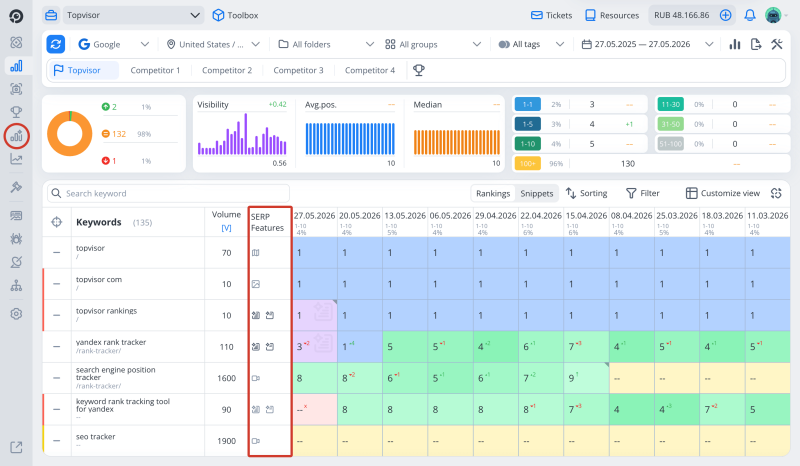
How it works
- In Google, the AI response icon indicates that an additional block with AI response really ranks for a keyword. Enable collection of AI responses to see the full text of the response and sources (URL) cited by the AI;
- In Yandex, the AI response icon does NOT mean that an additional block has definitely been found for the query, but it may be there. To not only find out for sure whether there is a block with Alice AI for a keyword, but also to see the full text of the response and the sources (URL) quoted by the AI, enable the collection of AI responses;
- A double dash means that not a single SERP Feature was found in search results;
- Different icons represent different blocks. Hover your cursor over the icon to see the block name;
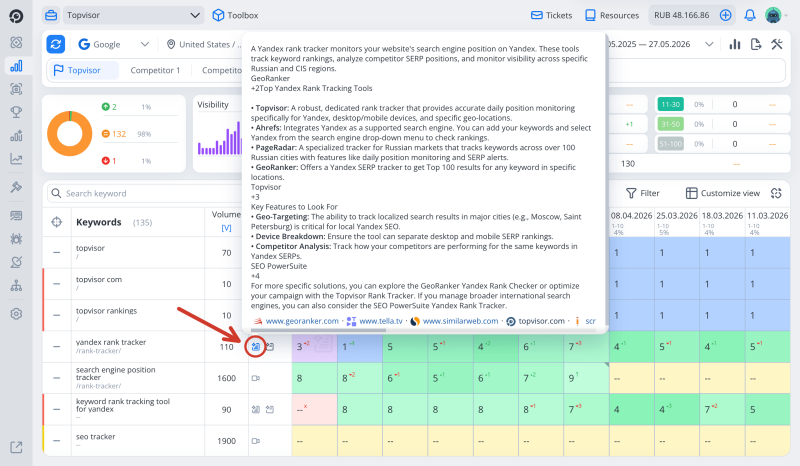
- Click on the AI Answers icon to see the answer text and links to the cited URLs;
- The block is displayed regardless of whether the project domain is found there;
- If a project's domain or a competitor is found in a SERP Feature block, the icon will be filled in (for AI Overviews / Quick answers from Alice AI);
- Information about the presence of blocks in SERP is not tied to the project and is stored in a common database. This means that it can appear immediately when keywords are added to the project, even if there have been no checks yet, and also that it can be updated if other users launch the check;
- Use SERP Features filter to see keywords that trigger specific SERP Features in the search results. More on the SERP Features filter →
SERP Features are only displayed in the new Rank Tracker design 🆕
To turn the new design on, go to Account settings and enable New version: Rank Tracker, Keywords.
To turn the new design on, go to Account settings and enable New version: Rank Tracker, Keywords.
A purple cell with a dash has appeared in my table; what does this mean?
A position on a purple background with a dash indicates that the site was mentioned in the AI response but did not appear in the organic search results.
What features we track
- AI Overviews / Quick answers from Alice AI;
- Pictures;
- Videos (Google only);
- Knowledge Panel (Google only);
- Maps (Google only).
How to enable collection of AI response texts
- To go Rank Tracker.
- Clickon the toolbar.
- PressAdditional settings in the drop‑down list.
- Toggle the switch Collect in the AI Overviews section.
After checking, click on the icon in the rankings table to see answer from the AI model and all its sources:
Texts of AI responses are stored for a month 🔁
We do not store the full history of AI snippets—only the last month's worth. The table displays only the AI response from the most recent check selected in the Calendar. To view earlier AI responses, select the corresponding period in the Calendar. To track the full history of changes to the response and its sources, export the data after each check.
We do not store the full history of AI snippets—only the last month's worth. The table displays only the AI response from the most recent check selected in the Calendar. To view earlier AI responses, select the corresponding period in the Calendar. To track the full history of changes to the response and its sources, export the data after each check.
Wanna track another SERP Features?
Contact us
- Tell us what features you want to track
- We'll add them after the research