 Русский
 English
- Topvisor Help Center /
- Rank Tracker /
- Summary /
- Visibility
Visibility in Summary
Visibility is a share of potential website impressions in Top for keywords added to the project, so many SEO‑experts consider it one of the most important metric in SEO.
How Visibility is calculated
To calculate Visibility, you need to know the position of the keyword, the CTR (click‑through rate) or “weight” that depends on the position, and the “[!Volume]” of the keywords ([Volume] for Google).
Visibility depends not only on position, but also on the volume of keywords. Frequency (search volume) is stored in a common database, and even if you haven’t checked it, the data could have been updated by other users. In this case, the frequency will be updated for you too; accordingly, Visibility will change.
View an example of how to calculate Visibility
Visibility formula
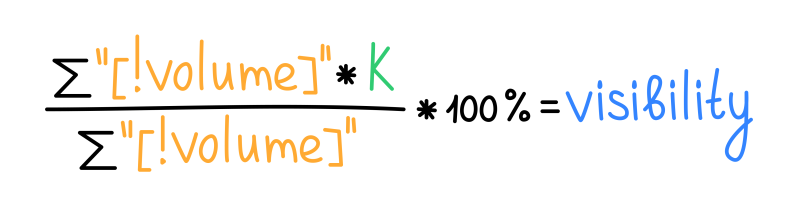
- ∑ — sum of values;
- k — CTR;
- "[!Volume]" — volume.
For example, Visibility can be high if keywords in a project have low volume but high ranks. Low volume indicates that the demand for these keywords is low or tends to zero. Despite high Visibility, such project won't get much traffic from SEO.
CTR
Topvisor calculates Visibility based on the “weight” of the rank and keywords volume. Weight is a coefficient that is calculated according to the rule: the higher a website's rank in search results, the greater the weight.
| Top | CTR |
| 1‑3 | 1 |
| 4 | 0.85 |
| 5 | 0.6 |
| 6‑7 | 0.5 |
| 8‑9 | 0.3 |
| 10 | 0.2 |
| 11‑15 | 0.1 |
| 16‑20 | 0.05 |
| 21+ | 0 |
Alert that Visibility is calculated incorrectly
To calculate Visibility we use Volume of keywords. If the volume is not checked or is not checked for all keywords , Visibility would be calculated incorrectly, and there would be an alert next to it.
How to check keywords Volume →
To have Visibility calculated correctly, click on the alert and then on Check Search Volume in the pop‑up window.
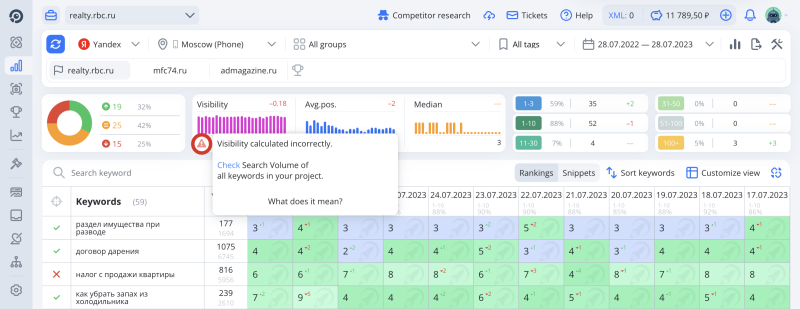
To calculate Visibility in Yandex, "[!Volume]" is used, and in order for Visibility to be calculated correctly, you need to check exactly this type of volume.