 Русский
 English
- Topvisor Help Center /
- Relevance check
Relevance check
Search engines may rank a different URL for a keyword than the one a webmaster optimizes for it. Use the relevant page check tool so that you can:
- find the most relevant pages for keywords in Yandex and Google;
- check which page search engine considers most relevant for a keyword.
If the most relevant page, according to the search engine, is the page you're optimizing for a query, then your SEO optimization is correct. It will most likely rank for that query.
If the relevant page the tool displays differs from the page you're optimizing, conduct detailed audit of the target URL. You can either make edits to the page, change its meta tags, etc., and ensure that the search engine considers the original page to be the most relevant. Or improve the page that is currently considered relevant in SERP and transfer key queries to it.
Relevance check algorithm
To check relevance, we add the site operator both for Yandex and Google to a keyword with the website domain from the main URL of the project, for example: site:zhmyh.com what is zhmyh. We then save and display the first URL that ranks for the query with the operator.
Just upload keywords. Our crawler will automatically insert the website domain from the project's main URL. If you add phrases containing URL to a project, the check will be inaccurate, as the domain will still be inserted during parsing a second time.
How to check relevant page
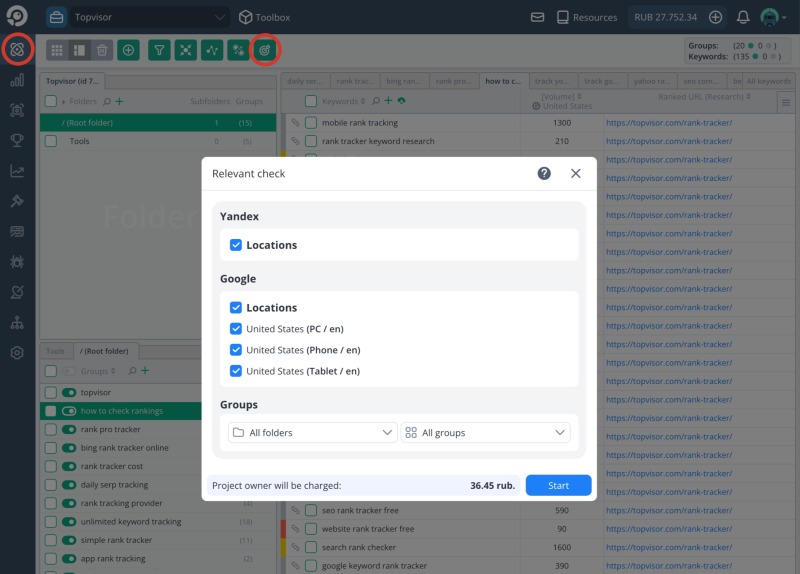
- Go to Keywords.
- Cleck on the toolbar.
- Tick search engines and locations you want to check in the popup. You can add search engines and locations in the project Settings.
- Choose folder and keyword group, if you need to check relevance only for phrases in the specific group.
How to view checked relevant pages
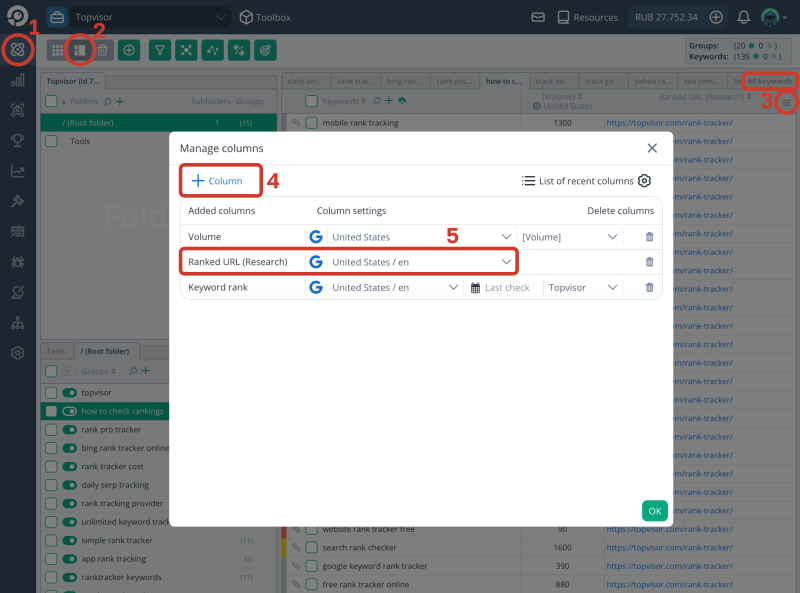
- Go toKeywords.
- Click on and go to Advanced mode.
- Select a group of keywords or All keywords.
- Click on and then + Column.
- Add column Ranked URL (Research). Up to 10 columns may be added. Double dash means there is no relevant URL for a keyword.
What is the difference between the columns Ranked URL (Research) and Ranked URL (Rank Tracker)?
How to assign checked page as target URL
- Go to Keywords.
- Click on the toolbar.
- Choose filter Assign Target = Ranked URL from the relevant recheck and press OK.