Русский
 English
- Topvisor Help Center /
- Billing and balance top up /
- Pricing Plans /
- Change pricing plan and unsubscribe
How to switch to a different Pricing Plan or unsubscribe from Pricing Plan
Last modified:
11/11/2020
You can change your plan any time, but your current plan will remain active until it expires. For example, you subscribed to the S plan on November 10 and changed it to М it on December 1. In this case, the S plan will be active until December 10, then it will be changed to М.
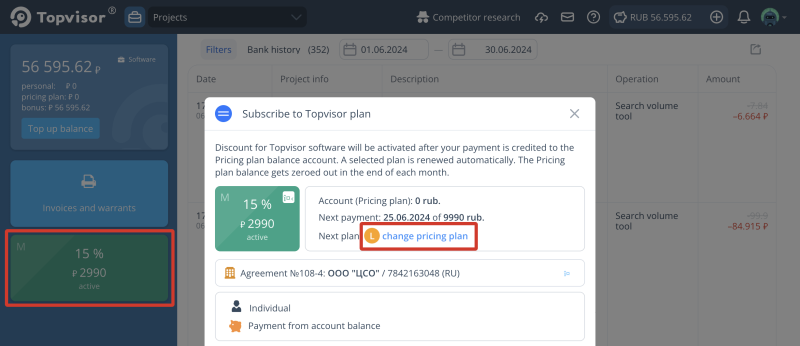
How to change a plan
- Go to Billing and click on the active plan.
- Click change a pricing plan and select next plan.
- Click Change plan.
I ran out of money on the Pricing Plan. I want to switch to a different plan, but it says that the next charge won't be soon. What should I do?
If you spent all funds in you Pricing plan account, top up your balance as an individual or a company. Discount is valid as long as subscription is activated. And when it ends, a new plan will be activated.
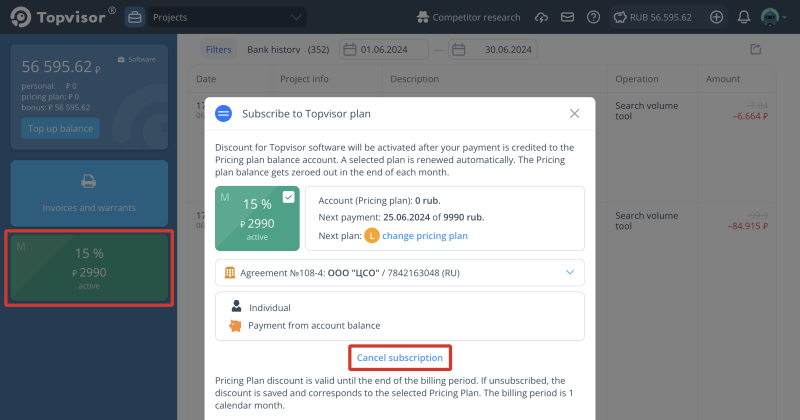
How to unsubscribe from the plan
- Go to Billing and click on the active plan.
- Click Cancel subscription.